---
title: VisualElement 可视化元素
---
# 属性
| 名称 | 用途 |
| -------------- | ---------------- |
| HighlightBrush | 设置控件高亮颜色 |
| Text | 设置文本内容 |
# 使用案例
对应`xaml`中添加`HandyControl`对应的命名空`xmlns:hc="https://handyorg.github.io/handycontrol"`
## HighlightBrush 设置控件高亮颜色
```xml
```
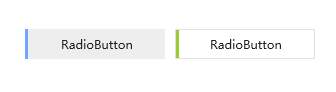
如下截图为一组选中状态时的高亮对比结果,左图为样式`默认颜色`,右侧为个人`自定义颜色`
## Text 设置文本内容
可视化文本内容,主要用于微软`WPF`库中原生控件需要显示辅助文本,但并没有对应的文本内容显示属性时,通过控件的自定义样式时,使用此附加属性进行进行文本内容的显示。
例如:当自定义进度条,需要显示文本时,本身缺少显示额外文本内容的属性,可以通过自定样式显示对应文本,以`Text`作为文本内容承载属性
自定义样式:
```xml
```
`xaml`中的使用:
```xml
```
效果:
