
135 lines
3.5 KiB
Markdown
135 lines
3.5 KiB
Markdown
---
|
||
title: PropertyGrid 属性编辑器
|
||
---
|
||
|
||
可自动为模型对象中的属性生成与之相匹配的编辑器集合.
|
||
|
||
```cs
|
||
[TemplatePart(Name = ElementItemsControl, Type = typeof(ItemsControl))]
|
||
[TemplatePart(Name = ElementSearchBar, Type = typeof(SearchBar))]
|
||
public class PropertyGrid : Control
|
||
```
|
||
|
||
# 属性
|
||
|
||
|属性|描述|默认值|备注|
|
||
|-|-|-|-|
|
||
|PropertyResolver|属性解析器|new PropertyResolver||
|
||
|SelectedObject|模型对象|||
|
||
|Description|描述|||
|
||
|MaxTitleWidth|最大标题宽度|0||
|
||
|MinTitleWidth|最小标题宽度|0|||
|
||
|
||
# 自带编辑器
|
||
|
||
|名称|说明|
|
||
|-|-|
|
||
| DatePropertyEditor | 日期编辑器 |
|
||
| DateTimePropertyEditor | 日期时间编辑器 |
|
||
| EnumPropertyEditor | 枚举编辑器 |
|
||
| HorizontalAlignmentPropertyEditor | 水平对齐方式编辑器 |
|
||
| ImagePropertyEditor | 图片编辑器 |
|
||
| NumberPropertyEditor | 数字编辑器 |
|
||
| PlainTextPropertyEditor | 纯文本编辑器 |
|
||
| ReadOnlyTextPropertyEditor | 只读文本编辑器 |
|
||
| SwitchPropertyEditor | 布尔编辑器(开关风格) |
|
||
| TimePropertyEditor | 时间编辑器 |
|
||
| VerticalAlignmentPropertyEditor | 垂直对齐方式编辑器 |
|
||
|
||
# 事件
|
||
|
||
|名称|说明|
|
||
|-|-|
|
||
| SelectedObjectChanged | 当模型对象改变时触发 |
|
||
|
||
# 案例
|
||
|
||
## 基础用法
|
||
|
||
```cs
|
||
public class PropertyGridDemoModel
|
||
{
|
||
[Category("Category1")]
|
||
public string String { get; set; }
|
||
|
||
[Category("Category2")]
|
||
public int Integer { get; set; }
|
||
|
||
[Category("Category2")]
|
||
public bool Boolean { get; set; }
|
||
|
||
[Category("Category1")]
|
||
public Gender Enum { get; set; }
|
||
|
||
public HorizontalAlignment HorizontalAlignment { get; set; }
|
||
|
||
public VerticalAlignment VerticalAlignment { get; set; }
|
||
|
||
public ImageSource ImageSource { get; set; }
|
||
}
|
||
|
||
public enum Gender
|
||
{
|
||
Male,
|
||
Female
|
||
}
|
||
```
|
||
|
||
```cs
|
||
DemoModel = new PropertyGridDemoModel
|
||
{
|
||
String = "TestString",
|
||
Enum = Gender.Female,
|
||
Boolean = true,
|
||
Integer = 98,
|
||
VerticalAlignment = VerticalAlignment.Stretch
|
||
};
|
||
```
|
||
|
||
```xml
|
||
<hc:PropertyGrid Width="500" SelectedObject="{Binding DemoModel}"/>
|
||
```
|
||
|
||
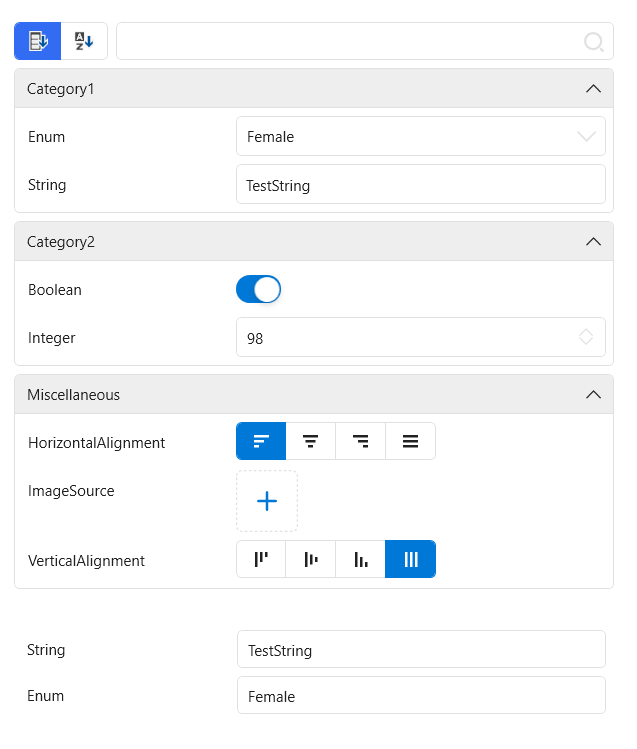
|
||
|
||
## 自定义编辑器
|
||
|
||
我们以 `PlainTextPropertyEditor` 为例,当需要自定义编辑器,我们可以从 `PropertyEditorBase` 继承,并重写某些方法,这些方法的定义如下表所示:
|
||
|
||
|名称|说明|备注|
|
||
|-|-|-|
|
||
| CreateElement | 创建具体操作控件 |必须重写|
|
||
| CreateBinding | 为具体操作控件创建数据绑定 ||
|
||
| GetDependencyProperty | 获取具体操作控件中需要绑定的依赖属性 |必须重写|
|
||
| GetBindingMode | 获取绑定模式 ||
|
||
| GetUpdateSourceTrigger | 获取更新数据源的触发模式 ||
|
||
| GetConverter | 获取绑定时需要使用的转换器 |||
|
||
|
||
纯文本编辑器的具体操作控件可以是 `TextBox`:
|
||
|
||
```cs
|
||
public override FrameworkElement CreateElement(PropertyItem propertyItem) => new System.Windows.Controls.TextBox
|
||
{
|
||
IsReadOnly = propertyItem.IsReadOnly
|
||
};
|
||
```
|
||
|
||
需要绑定的依赖属性应该是 `TextProperty`:
|
||
|
||
```cs
|
||
public override DependencyProperty GetDependencyProperty() => System.Windows.Controls.TextBox.TextProperty;
|
||
```
|
||
|
||
最后整体的代码如下:
|
||
|
||
```cs
|
||
public class PlainTextPropertyEditor : PropertyEditorBase
|
||
{
|
||
public override FrameworkElement CreateElement(PropertyItem propertyItem) => new System.Windows.Controls.TextBox
|
||
{
|
||
IsReadOnly = propertyItem.IsReadOnly
|
||
};
|
||
|
||
public override DependencyProperty GetDependencyProperty() => System.Windows.Controls.TextBox.TextProperty;
|
||
}
|
||
``` |