
83 lines
3.3 KiB
Markdown
83 lines
3.3 KiB
Markdown
---
|
|
title: 欢迎使用HandyControl
|
|
---
|
|
|
|
HandyControl是一套WPF控件库,它几乎重写了所有原生样式,同时包含80余款自定义控件(正逐步增加)。
|
|
|
|
# 要求
|
|
|
|
   
|
|
|
|
# 下载
|
|
|
|
## Nuget
|
|
|
|
Nuget上是编译好的发布版本,地址为:[HandyControl-Nuget](https://www.nuget.org/packages/HandyControl/)
|
|
{% note warning %}
|
|
Nuget上一般至少一个月发布一次,所以有很大的可能和本文档有出入,有出入的地方一切以本文档为准。
|
|
{% endnote %}
|
|
|
|
## Github
|
|
|
|
Github上是最新的源代码,地址为:[HandyControl-Github](https://github.com/HandyOrg/HandyControl)
|
|
{% note warning %}
|
|
Github上一般每天都有更新,相对而言不适合用于生产。
|
|
{% endnote %}
|
|
|
|
{% note warning %}
|
|
文档的更新速度必然跟不上最新的Github源码,有出入的地方一切以Github上Demo示例为准。
|
|
{% endnote %}
|
|
|
|
# 项目结构介绍
|
|
|
|
## 整体结构
|
|
|
|
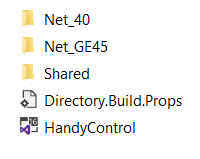
从Github上克隆好源码后,进入src文件夹,该文件夹结构如下:
|
|
|
|
|
|
这里一共有4个解决方案sln文件。
|
|
|
|
`Net_GE45`的意思是.Net版本大于等于4.5
|
|
|
|
`Shared`文件夹用于存放共享项目的代码
|
|
|
|
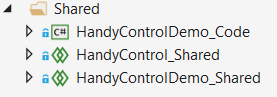
图中五个文件夹内部各包含两个子文件夹,例如在Shared中还包含两个子文件夹:
|
|
|
|
|
|
它们分别存放控件源码和控件示例源码。
|
|
|
|
## 源码结构
|
|
|
|
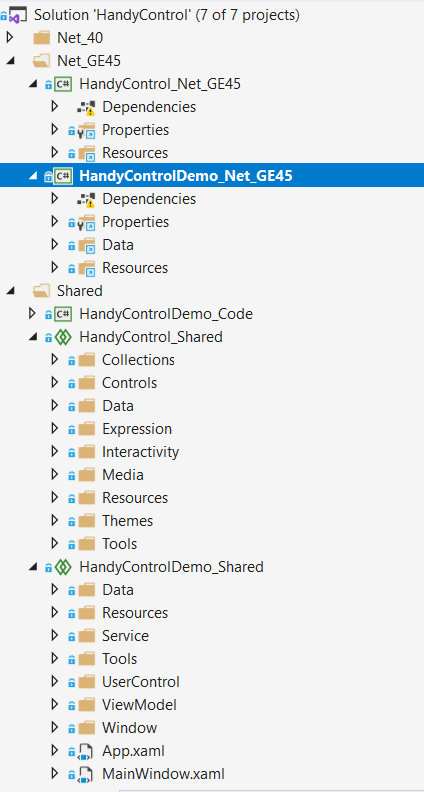
我们以HandyControl.sln为示例进行说明,使用VS2019打开该解决方案:
|
|
|
|
|
|
如果要启动示例,查看控件效果,请将HandyControlDemo_[指定的项目类型]作为启动项。
|
|
|
|
如图,已将HandyControlDemo_Net_GE45作为启动项。
|
|
|
|
大部分公共的源码都在Shared文件夹中,部分需要为特定项目类型定制的代码则被提出来放到各自的文件夹中。
|
|
|
|
HandyControl源码(主要在HandyControl_Shared中)主要包含7个文件夹,对它们的描述如下表所示:
|
|
|
|
| 名称 | 用途 |
|
|
|-|-|
|
|
| Controls | 包含所有控件的后台交互逻辑 |
|
|
| Data | 控件库所需的基本数据定义 |
|
|
| Expression | 抽取自Microsoft.Expression.Drawing |
|
|
| Interactivity | 抽取自Microsoft.Expression.Interactions & System.Windows.Interactivity,并做了部分修改 |
|
|
| Properties | 包含控件库属性和语言包 |
|
|
| Themes | 包含控件库所有的xaml定义 |
|
|
| Tools | 主要包含控件库所需的帮助方法和扩展方法 |
|
|
|
|
{% note info %}
|
|
Controls中的每个控件一般都能在Themes中找到对应的xaml定义。
|
|
{% endnote %}
|
|
|
|
# 编译源码
|
|
|
|
{% note warning %}
|
|
编译前请确认你的开发环境是否符合要求。
|
|
{% endnote %}
|
|
|
|
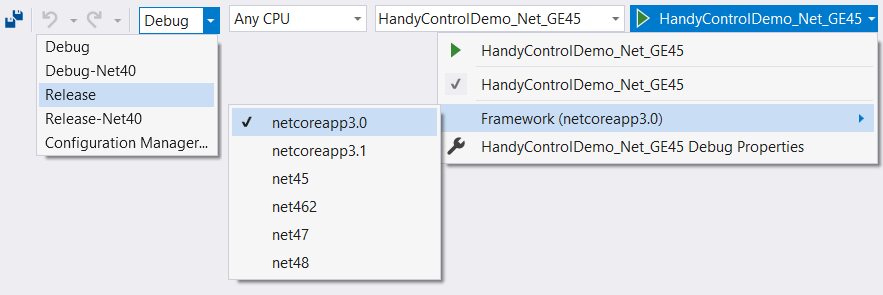
打开HandyControl.sln,在解决方案配置下拉框中选择指定的环境进行编译:
|
|
 |